Product preview

See Rovalty before you sign up.

Look through every screen of the brand and creator panels, watch how they work, or open the demo and try them yourself.
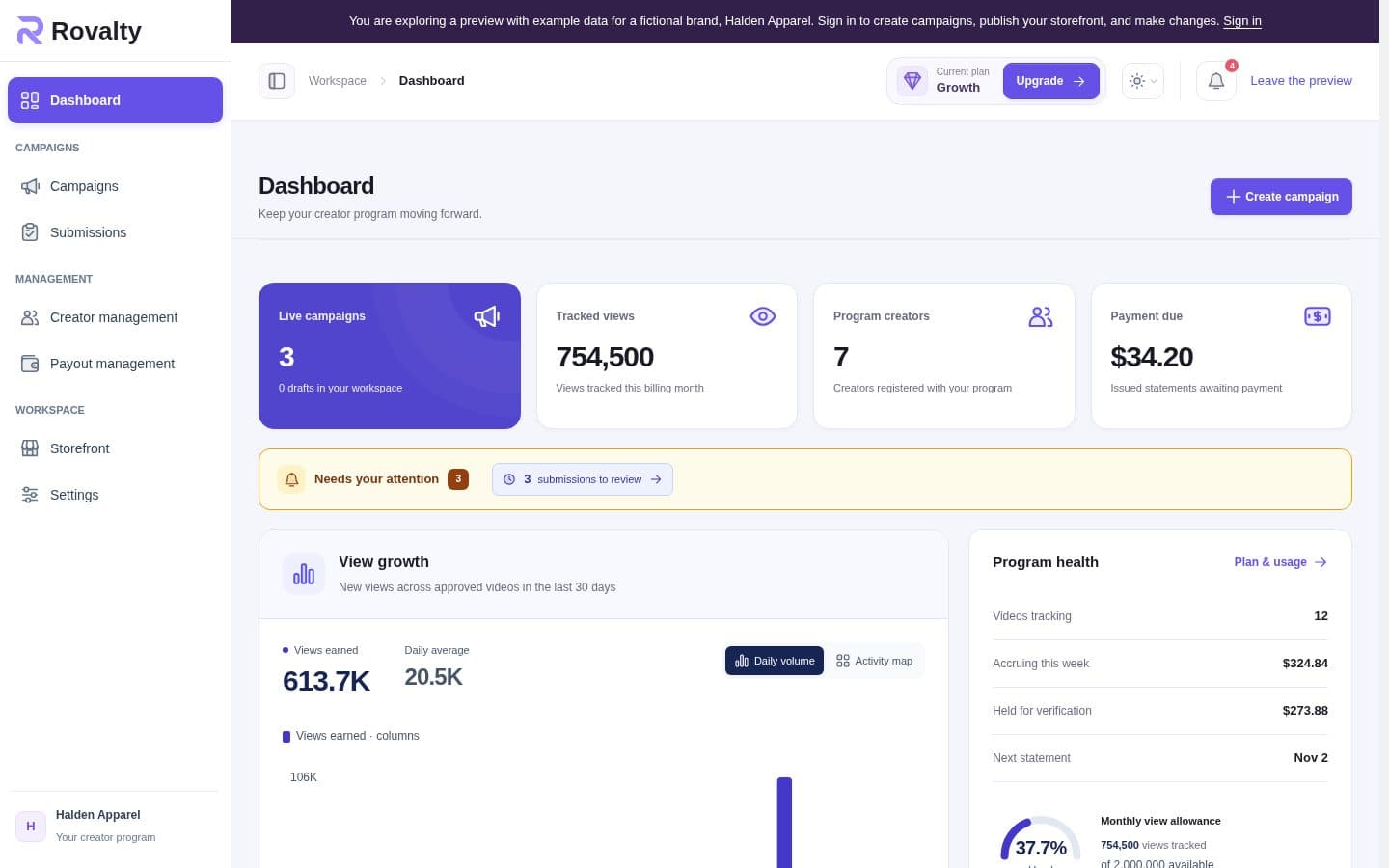
Two panels, one program

Rovalty has one panel for the brand running the campaigns and one for the creators making the videos. The brand panel is on the Rovalty website. The creator panel is on the platform each brand gets, at that brand's own address.

Brand panel

Log in on the Rovalty website and you are in your brand panel. This is where you create campaigns, review videos, manage creators and see what you owe. Shopify stores can also open it inside the Shopify admin.

Creator panel

Each brand gets its own creator platform, at an address like yourbrand.rovalty.com or creators.yourbrand.com. Creators go there to find campaigns, submit videos, follow views and earnings, and confirm payments.

The brand panel, page by page

  • Dashboard: shows live campaigns, videos waiting for review, program creators and what you owe. Below that are your tracked views against the monthly limit, new views per day over 30 days, top campaigns, earnings still on hold and a creator leaderboard. It refreshes every 30 seconds while you have it open.
  • Campaigns: lists your campaigns and how they are doing. A new campaign saves as a draft, and nothing goes live until you launch it.
  • New campaign: this is where you write the brief, list the requirements and choose what every caption must include: a mention, a name or a website link. You also set the rate, minimum views, per-video cap, hold window, budgets, how long videos must stay up, payment methods and allowed platforms. You can add footage as links or upload MP4, MOV or ZIP files, up to 2 GB each and 20 per campaign.
  • Submissions: sorts videos into All published, Pending approval, Rejected and Flagged. You can approve a video, or reject it with a reason the creator will see. Each video has its own stats, including views, likes, comments and shares.
  • Creator management: lets you search creators by name, email or handle. Open a profile to see their accounts, videos, campaigns and payout history. You can message a creator or block them from your program.
  • Payout management: shows who needs paying, what is pending and which payments need attention. You reveal a creator's payment details, pay them yourself and record the reference.
  • Storefront: edits the page creators land on, including the accent colour, hero wording, sections and social links. Creators see nothing new until you publish. The rates on the page come from your live campaigns, so you never type them by hand.
  • Settings: holds your branding, default payment methods, contact details and the switch for new creator sign-ups. It is also where you connect your own domain on a paid plan and choose whether to appear on the marketplace.
  • Plan and usage: shows your current plan and tracked views. You reach it from the plan link in the header.

The creator panel, page by page

  • Program page: the public front page of the brand's creator platform. It shows live campaigns, how the program works and common questions. Anyone can read a brief, but the brand's contact details only show after signing in.
  • Earnings: separates money still in its hold window from money ready for payment. It also lists statements, and this is where a creator confirms a payment or reports one that never arrived.
  • Campaigns: shows each open campaign's rate, platforms and payment method. From here a creator reads the brief and submits a video.
  • My work: lists every submitted video with its status, views and earnings.
  • Linked accounts: connects TikTok, Instagram and YouTube through each platform's own login. This proves the videos really belong to the creator.
  • Payment methods: stores how the creator wants to be paid, such as PayPal, bank transfer, Wise or Payoneer.

How brands use Rovalty

  • 1. Set up your page: log in on the Rovalty website, add your name and logo, choose your payment methods and publish your creator page.
  • 2. Create a campaign: write the brief, set your rate and limits, then launch.
  • 3. Share your link: send your creator platform address to creators, your users or clippers.
  • 4. Review videos: approve the ones you want. Views count from the moment the video was submitted, so a late approval costs the creator nothing.
  • 5. Pay each week: every Monday you get a statement. Pay each creator directly and record the reference.

How creators use Rovalty

  • 1. Join: open the brand's creator platform and sign in. There is no password to make.
  • 2. Link your accounts: connect the social accounts you post from.
  • 3. Post your video: follow the brief and put the required mention, name or link in your caption.
  • 4. Submit the link: a video without the required caption detail is refused, and the message tells you what is missing.
  • 5. Get paid: the brand pays you directly. Confirm the payment when it arrives, or report it if it doesn't. A payment nobody disputes confirms itself after 7 days.

The technical basics

You don't need any of this to get started, but it helps to know how the numbers work.

View tracking

Rovalty reads view counts from the official TikTok, Instagram and YouTube APIs. It never uses screenshots or scraping. Each video is read hourly for its first 48 hours, then daily.

How earnings are worked out

Once a video passes the campaign's minimum views, it earns the campaign's rate per 1,000 views, up to the per-video cap and the campaign budget. For example, 24,600 views at $1.10 comes to $27.06.

Hold window

New earnings wait before they can go on a statement, which leaves time for fraud checks and for videos to stay up. Each brand sets the wait on the campaign, from 48 to 720 hours, and it is 72 by default.

Weekly statements

Statements close every Monday, and amounts under $25 roll over to the next one. Brands then have 7 days to pay. Rovalty never receives or moves the money.

Fraud checks

On Growth plans and up, Rovalty compares views with engagement. If a video looks wrong, it is flagged and its earnings are held until you review it. A spike with real engagement isn't flagged.

Fixed campaign terms

Once a creator submits a video, the rate, minimum views, per-video cap and caption detail are locked. Creators can trust the terms they signed up for.

Technical FAQs